
My client came to me with a problem that sounds all too familiar: their WooCommerce store was loading slowly, checkout was lagging, and they had a concerning number of failed orders. After some investigation, I discovered the culprit wasn’t their theme, hosting, or product catalog size.
It was their wishlist plugin.
A simple feature that should help convert visitors into customers was actually destroying their sales. The plugin was executing code and throwing errors on every page load—even on pages that had nothing to do with wishlists, even on wp-admin.
This discovery sparked a question: if one of the most popular wishlist plugins could cause such severe performance issues, what about the others?
I decided to conduct a comprehensive performance test of the six most popular WooCommerce wishlist plugins to find out which ones are safe to use and which ones might be silently killing your sales. Share on XThe Contestants
I tested free versions of six wishlist plugins with a combined total of over 800,000 active installations free versions:
- YITH WooCommerce Wishlist (600,000+ installs) – The market leader, obviosely. Nothing related to performance in description.
- WPC Smart Wishlist by WP Clever (100,000+ installs) – Promises “Ultra-speedy Performance”
- QODE Wishlist by QODE (10,000+ installs) – Performance not mentioned.
- Wishlist for WooCommerce by WP Factory (3,000+ installs) – No performance claims.
- MoreConvert Wishlist (9,000+ installs) – “Fast AJAX interaction for all frontend events”
- TI WooCommerce Wishlist by Template Invaders (100,000+ installs) “Fast AJAX interaction for all frontend events” yeah, exactly the same phrase 🤷

Testing Environment and Methodology
To ensure fair testing, I created a clean WordPress installation with WooCommerce and cloned it six times— one separate install for each plugin. The test environment included:
- 4,000 products of different types
- 1,000 orders
- 244 users
While this isn’t as large as a real production store, it’s sufficient to reveal performance differences between plugins.
To conduct perfromance tests I used:
- Query Monitor to track database queries (Test #1)
- My own DB queries logger to capture all database queries performed during certain AJAX request (Tests #3,#4,#5)
- Performance Lab to see page load time changes (Tests #6, #7 and #8)
Metodology of each test I am explaining separetely below.
Test 1: Does It Do Anything Crazy on Activation?
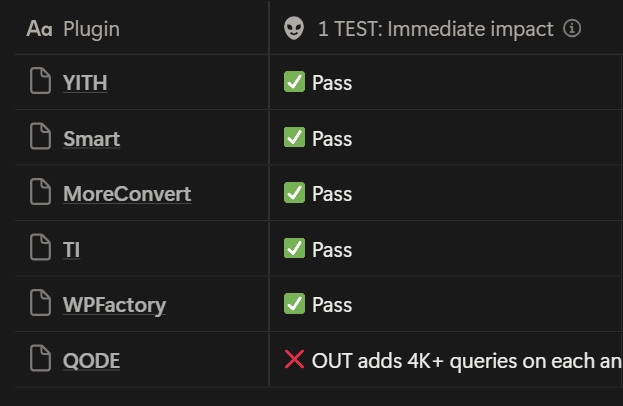
The first test was simple: activate the plugin and see if it immediately causes problems — via Query Monitor — database queries number before/after, CRON jobs, errors, whether code is executed on unrelated pages etc.
For context, average WP page load requieres around 200 queries.
YITH Wishlist: Query count jumped from ~100 to 254 on activation, then returned to normal on other pages. Not great, but acceptable.
✅ Pass
QODE Wishlist:
Life has not prepared me for this.
Upon activation, the plugin executed 4,359 queries on every single page—product pages, checkout, even the About page that had nothing to do with e-commerce functionality. It was calling WP_Post instance as many times as there were products in the database on every page load. In addition to a few hundred of other calls.
Every single page (frontend and dashboard, both) went to 4,000+ queries.
❌ Eliminated from the race
WPC Smart Wishlist: Query count didn’t change significantly, showing good initial behavior. On product pages with the “Add to Wishlist” button, it only used ~200 queries.
✅ Pass
MoreConvert: Did some cron jobs and showed some slow queries in Query Monitor, but nothing catastrophic.
✅ Pass (with notice)
TI Wishlist: Showed PHP errors on all pages, indicating its code was executing even when not needed. However, query count wasn’t terrible.
✅ Pass (with notice)
WP Factory: No crazy behavior on activation.
✅ Pass
Result: QODE Wishlist eliminated. Five plugins advance to the next round.
Test 2: Where Does the Plugin Store Wishlist Data?
This test examined how each plugin stores user wishlist data—a critical factor for database performance and scalability.
The possible biggest red flag🚩? Storing wishlist data in wp_options with autoload enabled. This would load all wishlist data into memory on every page load, regardless of whether it’s needed.
Storage locations discovered:
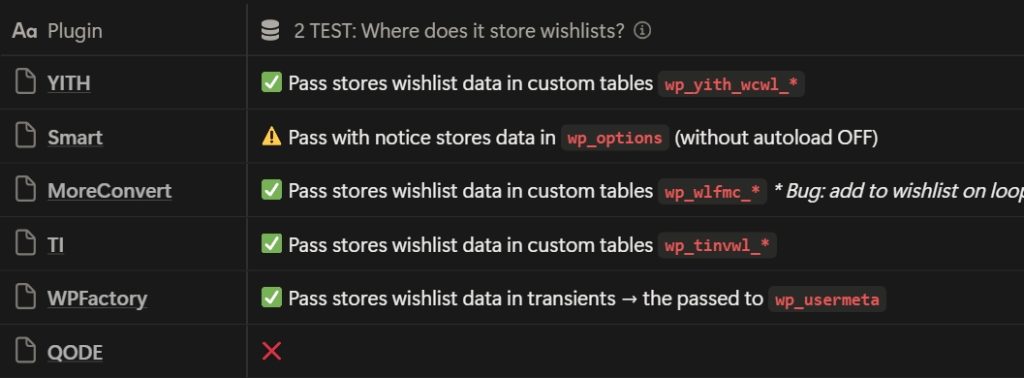
- YITH: Stores users wishlist data in custom database tables ✅
- WPC Smart: Stores users wishlist datain
wp_options😱, but with autoload OFF ⚠️ - MoreConvert: Custom database tables ✅
- TI Wishlist: Custom database tables ✅
- WP Factory: Uses transients, then moves data to
wp_usermeta✅
While WPC Smart’s approach of using wp_options isn’t catastrophic (since autoload is disabled), it’s bad. The wp_options table isn’t designed for storing large amounts of dynamic data.
Custom tables are the proper solution for this type of data, wp_usermeta is good as well.
Result: All five plugins pass, but WPC Smart receives a notice for suboptimal data storage.
Test 3: Adding One Item to an Empty Wishlist
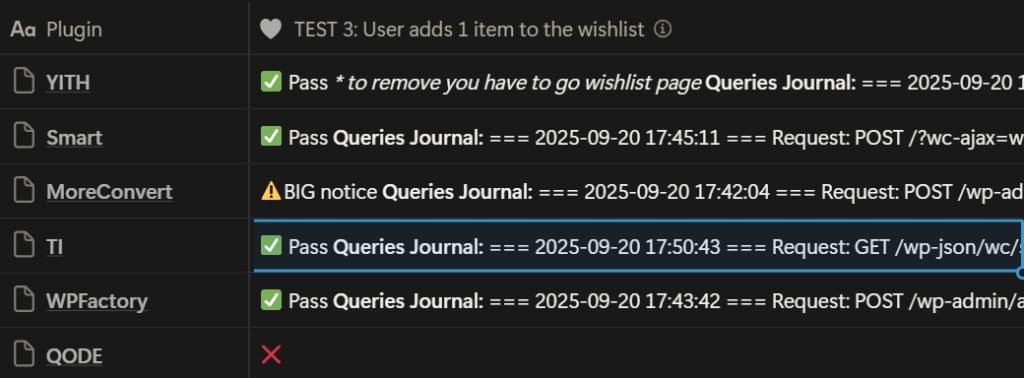
In this test I measured the database queries and time required to add a single product to an empty wishlist.
Results for a single “Add to Wishlist” action (queries / total database time):
- YITH: 1 request of 81 queries ✅
- WPC Smart: 1 request of 86 queries ✅
- MoreConvert: This plugin showed concerning behavior. A single “Add to Wishlist” action triggered 5 separate requests (4 AJAX + 1 CRON) totaling around 421 queries to add one item to a wishlist.⚠️
- TI: 2 requests of 91 queries ✅
- WP Factory: 1 request 97 queries ✅
4 of 5 plugins stayed within 80-100 queries except MoreConvert, which required 5 times more database queries for the same simple action ☹️.
Result: MoreConvert receives a big notice but continues in the race.
Test 4: Adding the 51st Item to the Wishlist
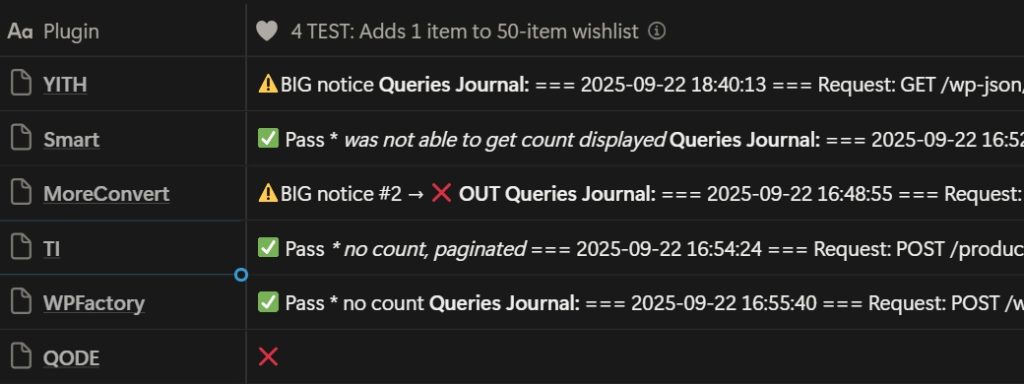
This test revealed how plugins scale when the wishlist already contains data. I added 50 items to the wishlist, then measured the performance of adding just one more, 51st, item.The results were eye-opening and revealed significant… Share on XYITH: Made 3 requests totaling 730 queries🤯 (574 + 89 + 67 queries across the requests). Even though it uses the modern REST API approach, the backend implementation doesn’t scale well. The plugin performs reasonably when the wishlist is empty but degrades dramatically in real world, where users do have items in their wishlists. ⚠️
WPC Smart: Maintained excellent performance with 1 request with 69 database queries – nearly identical to its performance with an empty wishlist. This shows good architectural design that doesn’t degrade with scale. ✅
MoreConvert: Now required 7 requests with approximately 80-90 queries each, 568 queries in total to add a single item when the wishlist already had 50 items — even worse than with an empty wishlist. MoreConvert doesn’t seem to convert on real websites 🤷
❌ Eliminated from the race
TI: 1 request of 58 queries. Beautiful. ✅
WP Factory: 91 queries in a single request. Maintained good performance without degradation. ✅
The most concerning finding: YITH’s 9x increase in queries when moving from an empty wishlist (81 queries) to a 50-item wishlist (730 queries) suggests a scalability problem that will only worsen as wishlists grow larger.
Result: MoreConvert eliminated after 2 BIG notices. Four plugins remain.
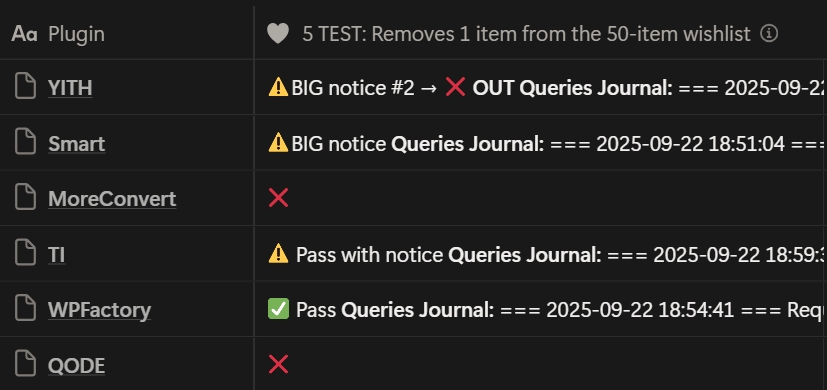
Test 5: Removing One Item from a 50-Item Wishlist
Testing removal operations revealed another performance dimension and exposed critical scalability issues.
YITH: Made 5 requests totaling 1404 queries to remove a single item from a 50-item wishlist. This is completely unacceptable for what should be a simple delete operation.
For context, removing an item requires more database queries than average WP page load which is around 200 queries.
❌ Eliminated from the race
WPC Smart: Two requests totaling 601 queries. While this is concerning (601 queries to remove one item is… excessive, if I would want to sound polite), it’s far better than YITH’s performance. The plugin continues but with a significant notice.
⚠️
TI: Three requests with a total of 260 queries. Multiple requests for a single operation isn’t ideal, but the query count looks even not that scary after what we´ve already seen. Receives a notice but continues.
⚠️
WP Factory: 89 queries in a single request—the clear winner of this test. A single, efficient request that completes in under 50ms. This is how wishlist operations should work.
✅
The performance gap here is staggering: WP Factory used 89 queries while YITH used over 1,400 queries for the same operation—more than an 11x difference.
Result: YITH eliminated. Three plugins remain: WPC Smart, TI, and WP Factory.
Test 6, 7 and 8: Global Impact on Page Load Times
For the final test, I measured how each plugin affects page load times across the entire website using the Performance Lab plugin from WordPress’s performance team. I ran 20 tests on each page to get median results, eliminating fluctuations.
I tested three scenarios:
- Clean install (baseline)
- Plugin installed and activated
- Plugin previously installed but now deactivated (shocking results)
Testing pages with and without plugin deactivation revealed a concerning trend: many plugins impact performance even after deactivation because they leave behind database tables, options, and other data.

Baseline (WooCommerce only):
- Product page: 1.01s (1005.14 ms)
- Shop (Archive) page: 1.12s (1119.1 ms)
- About page (non-commerce): 0.58s (578.51 ms)
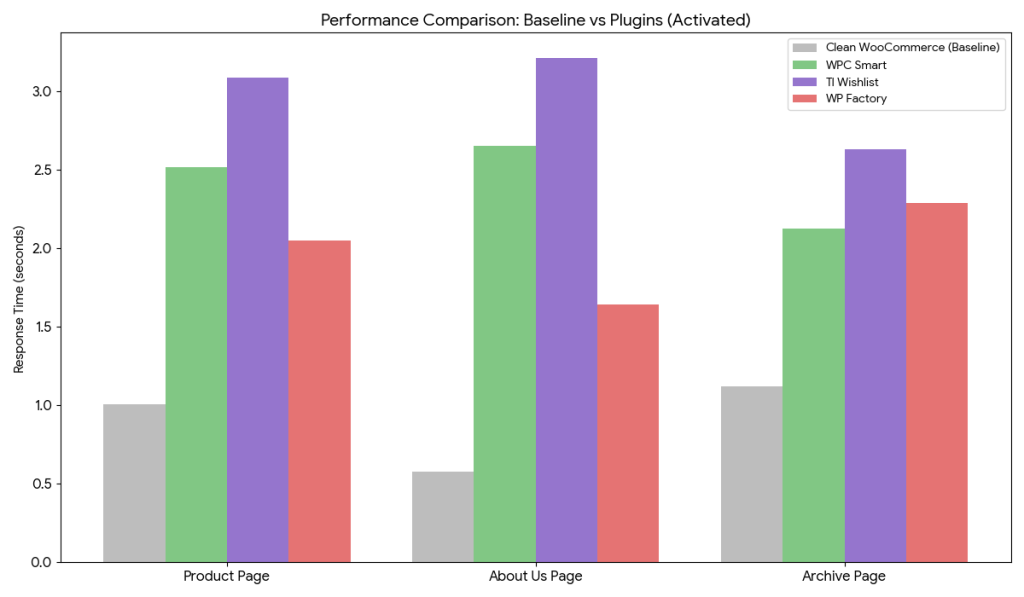
Test 8 summary: Response Time when Plugin is Activated (Seconds)
| Page Type | Baseline (WooCommerce) | WPC Smart | TI Wishlist | WP Factory |
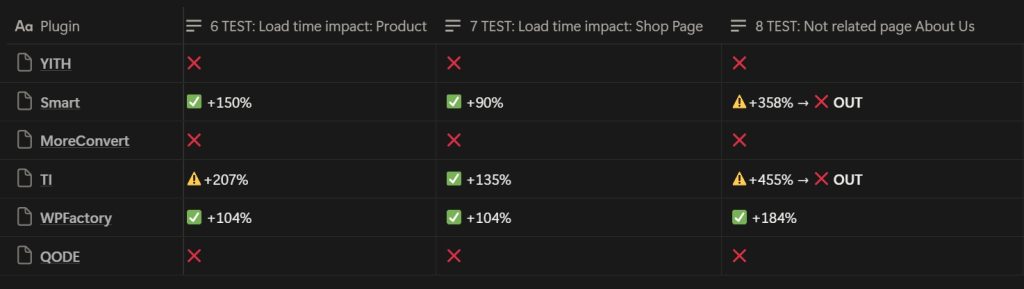
| Product Page | 1.01s | 2.52s (+150%) | 3.09s (+207%) | 2.05s (+104%) |
| Shop (Archive) | 1.12s | 2.13s (+90%) | 2.63s (+135%) | 2.29s (+104%) |
| About (Non-Commerce) | 0.58s | 2.65s (+358%) | 3.21s (+455%) | 1.64s (+184%) |
Key Takeaways:
- Non-Commerce Bloat: All three plugins significantly impact pages that do not require wishlist functionality (like the About Us page), but WP Factory manages this the best, keeping the load time under 2 seconds.
The data shows WP Factory consistently had the lowest performance impact across all page types, both when activated and deactivated. - Most Efficient: WP Factory is the clear winner for performance. It has the lowest impact on the Product page and the About page. While WPC Smart is slightly faster on the Shop page, WP Factory’s overall footprint is significantly smaller.
- Heaviest Impact: TI Wishlist is the slowest plugin in every category when activated. On a standard “About Us” page with no commerce functionality, it slows the load time by over 5.5x compared to the baseline.
Results:
- WPC Smart: ❌ Eliminated
- TI: ❌ Eliminated
- WP Factory: Passed all tests with the lowest impact ✅ Winner
The Winner: WP Factory Wishlist
After six rounds of rigorous testing, WP Factory’s Wishlist for WooCommerce emerged as the only plugin that consistently performed well across all tests.
| Test # | Category | WP Factory Result | Status | Key Observation |
| 1 | Activation | Clean (~100 queries) | ✅ Pass | No immediate query spikes or errors. |
| 2 | Data Storage | wp_usermeta / Transients | ✅ Pass | Uses native WP methods; avoids wp_options bloat. |
| 3 | Add (1st Item) | 97 Queries | ✅ Pass | Single request, efficient execution. |
| 4 | Add (51st Item) | 91 Queries | ✅ Pass | Zero Degradation. Scaling does not increase DB load. |
| 5 | Remove Item | 89 Queries | ✅ Pass | 15x more efficient than the market leader (YITH). |
| 6 | Product Page Load Impact | 2.05s (2051.44 ms) | ✅ Pass | Lowest impact among finalists (+104% vs baseline). |
| 7 | Archive (Shop) Load Impact | 2.29s (2285.71 ms) | ✅ Pass | Steady performance on heavy catalog pages. |
| 8 | About Us Page Load Impact | 1.64s (1644.10 ms) | ✅ Pass | The smallest impact on pages not related to Woo |
What’s truly remarkable about this result?
WP Factory has only 3,000 installations—the smallest plugin I tested. They don't even mention performance on their plugin page. Yet they dramatically outperformed market leaders with hundreds of thousands of installations, large… Share on XThe WooCommerce wishlist plugin might be killing your sales right now, and you wouldn’t even know it
Performance degradation happens gradually and goes unnoticed until it shows up in abandoned cart metrics or customer complaints—just like it happened to my client.
This client’s case is not unique. They came to me with slow load times, lagging checkout, and failed orders—symptoms that could have dozens of causes. The root cause was a single plugin making thousands of unnecessary database queries on every page load.
They had chosen a popular plugin, but that didn’t guarantee their website would stay fast or profitable.
After this research I recommended WP Factory to my client. We made the switch, and it proved to be a good decision. I sincerely congratulate the WP Factory team on winning this performance race.
But what really concerns me is: why do market leaders lose with such a huge difference?
I’m publishing these results hoping the plugins in this study will improve their performance rather than ignore the fact they’re potentially harming 800,000+ websites (counting only free versions).
The Bigger Picture
This investigation reveals a systemic problem in the WordPress ecosystem: the most popular plugins aren’t necessarily the best plugins. They’re often just the oldest, the most heavily marketed, or the ones that rank well in search results.
The feedback loop is broken. Developers don’t always have performance expertise, users don’t know how to measure performance impact, and poor performance manifests as “the site feels slow” rather than clear metrics. By the time someone investigates, they’ve already invested in setup and customization. The plugin remains popular despite poor performance.
The WordPress ecosystem has a broken feedback loop: the most popular plugins aren't necessarily the best plugins. They're often just the oldest, the most heavily marketed, or the ones that rank well in search results. Share on XWe need to change this by testing plugins before deployment, sharing performance comparisons publicly, holding popular plugins to higher standards, and supporting quality developers regardless of installation counts.
A Note on Bias
I want to be absolutely clear: I have no relationship, affiliation, or association with WP Factory or any plugin developer mentioned in this article. I’m as surprised by these results as you might be.
I expected larger, more established WordPress wishlist plugins with bigger teams and budgets to perform better. The fact that they didn't should concern everyone in the WordPress community Share on X
P.S. I you have not yet — watch the video result of this research:
Leave a Reply